 Native macOS iPhone File Manager
 A real file tree for your iPhone and local backups.
iOS sandboxing and Finder's 40-character SHA-1 backup hashes make finding a single file feel impossible. iPhone Data Manager decodes your device folders and backup file trees into a clean, navigable hierarchy on your Mac.
- 100% local
- Notarized by Apple
- No account needed
- Free to try
See the iPhone Folders & Backup File Trees That Finder Hides
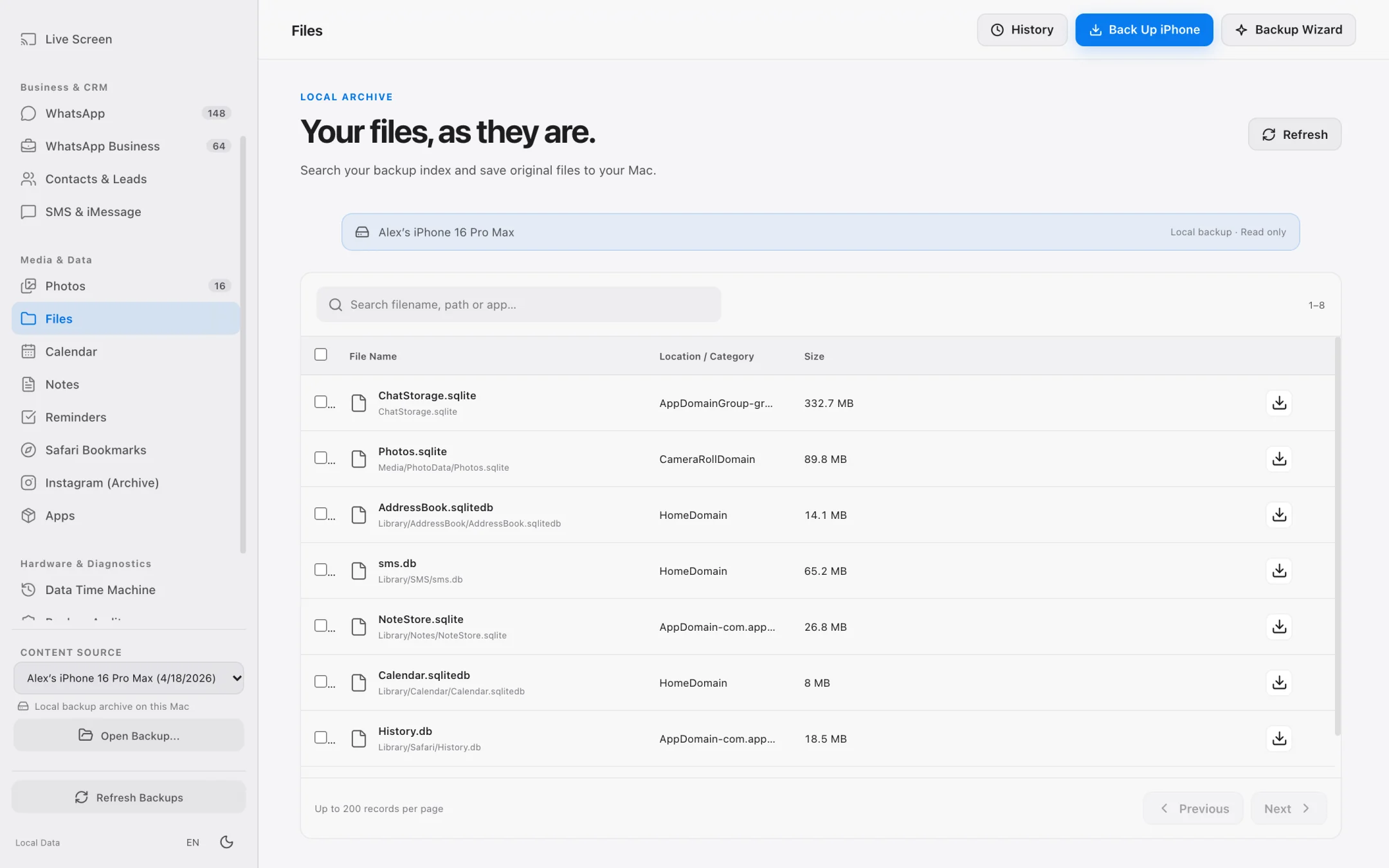
macOS Finder buries iPhone backups under 40-character SHA-1 hashes (like 7c7fba66680ef796b916b067077cc246adacf01d). iPhone Data Manager parses Manifest.db locally to reconstruct the human-readable folder hierarchy.
Connected iPhone — Accessible App Containers (AFC / House Arrest)
Read-only access over USB or local Wi-Fi to document-sharing app sandboxes and camera roll media directories.
iPhone 16 Pro (USB-C · Read-Only AFC)
├── 📁 DCIM/
│   ├── 📁 100APPLE/ (4,210 HEIC / MOV originals · 38.4 GB)
│   └── 📁 101APPLE/ (1,890 ProRAW / 4K60 clips · 44.1 GB)
├── 📁 Books & PDFs/
│   └── 📄 Signed_Contract_2026.pdf (4.2 MB)
└── 📁 Accessible App Containers (UIFileSharingEnabled)/
    ├── 📁 VLC / Infuse Media/
    │   └── 🎬 Offline_Project_Render_4K.mov (6.8 GB)
    ├── 📁 GarageBand / Voice Memos/
    │   └── 🎵 Studio_Session_Take3.m4a (84 MB)
    └── 📁 Keynote / Pages / Numbers Local Docs/
        └── 📊 Q4_Financial_Model.xlsx (12.4 MB)
Local Backup — From Opaque SHA-1 Hashes to Real Domain Trees
Obfuscated backup blobs are mapped automatically into structured iOS domains (AppDomainGroup, HomeDomain, CameraRollDomain).
Local Backup (Manifest.db Decoded · Read-Only SQLite)
├── 📁 AppDomainGroup-group.net.whatsapp.WhatsApp.shared/
│   ├── 🗄️ ChatStorage.sqlite (7c7fba66...f01d · 1.42 GB · 148,200 messages)
│   └── 📁 Message/Media/
│       ├── 📁 +90532XXXXXXX@s.whatsapp.net/ (Invoices, PDFs, Voice Notes)
│       └── 📁 Business_Client_Group@g.us/ (2,410 attachments)
├── 📁 HomeDomain/
│   ├── 🗄️ Library/SMS/sms.db (3d0d7e5f...b92a · iMessage & SMS History)
│   └── 🗄️ Library/AddressBook/AddressBook.sqlitedb (31bb7ba8...4c11 · Contacts)
└── 📁 CameraRollDomain/
    └── 📁 Media/PhotoData/Mutations/ (Original unedited assets + AAE edits)
Mac / External SSD Output — Original Filenames & Folder Tree Preserved
Batch-extracted directories keep their original filenames, timestamps, and nested folder structure on macOS.
/Volumes/Samsung_T9_SSD/iPhone_Exports_2026-10/
├── 📁 WhatsApp_Exports/
│   ├── 📄 Client_Chat_Transcript_SHA256.pdf (Tamper-evident root hash verified)
│   ├── 📊 Extracted_Business_Leads_IBANs.csv (342 phone/email/IBAN records)
│   └── 📁 Media_Attachments/ (Original filenames & timestamps preserved)
├── 📁 Camera_Roll_Originals/
│   ├── 🖼️ IMG_4821.HEIC (Original EXIF + GPS metadata intact)
│   └── 🎬 IMG_4822.MOV (4K 60fps · Zero recompression)
├── 📁 Contacts_Archive/
│   └── 📇 All_Contacts_Filtered_vCard3.vcf (Standard vCard 3.0)
└── 📁 App_Files_Batch_Extract/
    └── 📁 VLC_Offline_Media/ (Exact subfolder hierarchy preserved)
Why standard macOS tools fail as an iPhone file manager
Finder's 'Files' tab only shows a tiny list of top-level app icons with slow drag-and-drop, and completely hides the thousands of files stored inside your local backups.
Technical Barrier 01
The 40-character SHA-1 hash problem
When macOS backs up your iPhone to ~/Library/Application Support/MobileSync/Backup, every file is renamed to a SHA-1 hash of its domain and path. Without parsing Manifest.db, you cannot tell a PDF invoice from a system plist.
Technical Barrier 02
Message and WhatsApp attachments scattered across hundreds of subfolders
SMS, iMessage, and WhatsApp attachments live inside deeply nested domain folders (`~/Library/SMS/Attachments/xx/yy/`). Browsing them manually takes hours.
Technical Barrier 03
Lost filenames and flattened folders during export
Many basic extractors dump thousands of files into a single flat folder with generic names. iPhone Data Manager reconstructs and preserves the exact directory hierarchy and original filenames.
Files & Backup Tree Browser
Navigate accessible iPhone folders and raw backup trees side by side.
Whether your iPhone is plugged in right now or you are inspecting a backup from two years ago on an external drive, you get a clean hierarchical tree.
- Browse accessible iPhone app document containers and media directories directly.
- Automatically decodes local backup file trees into readable domain folders.
- Batch-select multiple folders or files and extract them in a single operation.
- Preserves original filenames, extensions, and nested subfolder structures.
Dedicated Attachment & Database Views
Go beyond raw files: inspect structured SQLite databases.
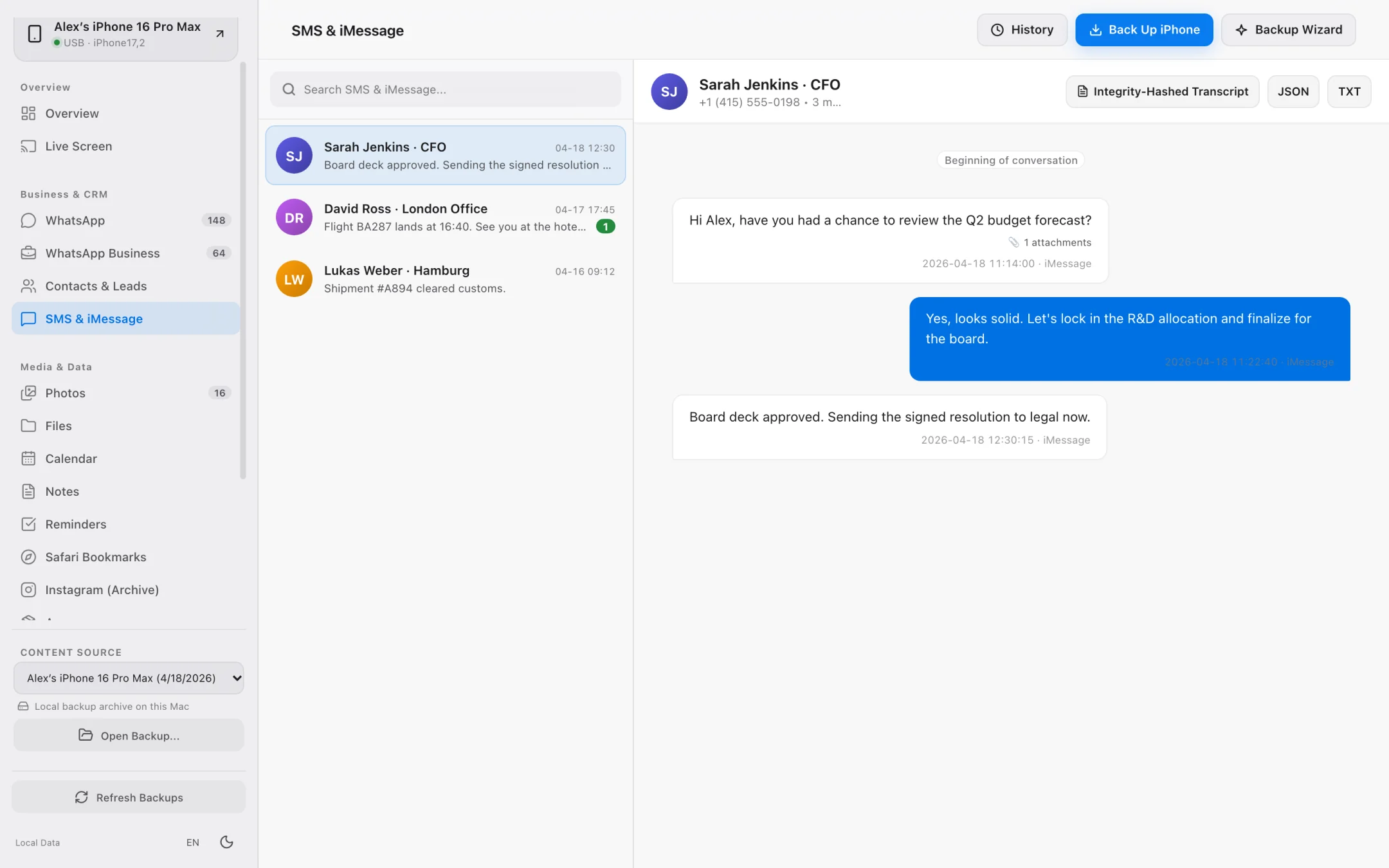
Some of your most important 'files' on an iPhone are actually records inside SQLite databases. iPhone Data Manager parses them into dedicated browsers.
- Dedicated attachment inspector for SMS & iMessage photos, videos, and documents.
- WhatsApp media, chat CSV exports, business lead tables, and SHA-256 PDF transcripts.
- Data Time Machine compares two backup file trees to pinpoint added, modified, or deleted items.
- 100% read-only operation ensures zero risk of corrupting iOS app sandboxes.
Step-by-Step Workflow
How to Browse iPhone App Folders and Backup Files on a Mac
Access connected iPhone document folders and decode local backup file hierarchies without jailbreaking or modifying your device.
Connect via USB or open an existing local backup
Pair your iPhone with your Mac over USB (or Wi-Fi after trusting) or select any local backup stored on your Mac or external drive.
Navigate the decoded folder hierarchy
Open the Files module to browse accessible iPhone app document folders and decoded backup domains (HomeDomain, AppDomainGroup, CameraRollDomain).
Batch-select and extract to macOS Finder
Select individual files or entire directory branches and extract them in one batch with original filenames and nested folder structures preserved.
File Access Capabilities
Finder 'Files' Tab vs. Raw Backup Folder vs. iPhone Data Manager
See how a purpose-built iPhone file manager for Mac unlocks both live device folders and historical backups.
| File Management Capability | Finder 'Files' Tab | Raw MobileSync Folder | iPhone Data Manager |
|---|---|---|---|
| Accessible App Folders (Connected iPhone) | Top-level list only, clunky UI | Not applicable | Full hierarchical tree with batch selection & size info |
| Browse Inside Local Backups | No | Unreadable 40-char SHA-1 filenames | Decoded human-readable folder hierarchy |
| Preserve Folder Structure on Export | Manual drag-and-drop per app | No — requires manual SQLite scripting | 1-click batch extraction with original folder tree intact |
| SMS / iMessage Attachment Extraction | No | Buried in 256 hex subdirectories | Organized attachment list filterable by contact & thread |
| Encrypted Backup File Access | Restore-only | AES-encrypted (unreadable) | Unlocks locally using your backup password |
Frequently asked questions.
Does iPhone Data Manager require jailbreaking my iPhone to browse files?
No. It works with standard, unmodified iPhones running iOS using Apple's official pairing protocols and local backup structures.
Can I modify or overwrite system files on my iPhone?
No. iPhone Data Manager is engineered to be strictly read-only. This guarantees that browsing or extracting files can never brick your iPhone or corrupt an app container.
Can I browse files inside an encrypted iPhone backup?
Yes. In the 7-day trial and paid plans, simply enter the backup password you set in Finder or iTunes, and the entire file tree and databases decrypt locally in memory on your Mac.
What happens to folder structures when I export hundreds of files?
iPhone Data Manager preserves the original filenames and recreates the exact subfolder hierarchy inside your chosen Mac or external drive destination folder.
Explore Specialized Workflows
iPhone Storage Manager
Free up gigabytes on your iPhone and Mac with external SSD backups, Lean Mode, and exact byte-size photo offloading.
iPhone Transfer Software
Transfer photos, 4K videos, WhatsApp chats, SMS, and contacts from iPhone to Mac in standard, open formats.
UltFone Alternative for Mac
See how a 100% native, Apple-notarized, read-only macOS app compares to cross-platform utility suites.
My Data Manager iPhone Guide
Track cellular data quotas in iOS and inspect live network traffic & local backups on your Mac.
See what is on your iPhone today.
Free to download. Browse your data and run full backups before paying a cent.