 iPhone Storage Manager for macOS
 Reclaim your iPhone storage — without filling up your Mac.
Stop paying monthly cloud rent for old 4K videos and massive WhatsApp histories. Inspect what is consuming your iPhone storage, offload original media to an external drive, and run Lean Mode backups 100% locally on your Mac.
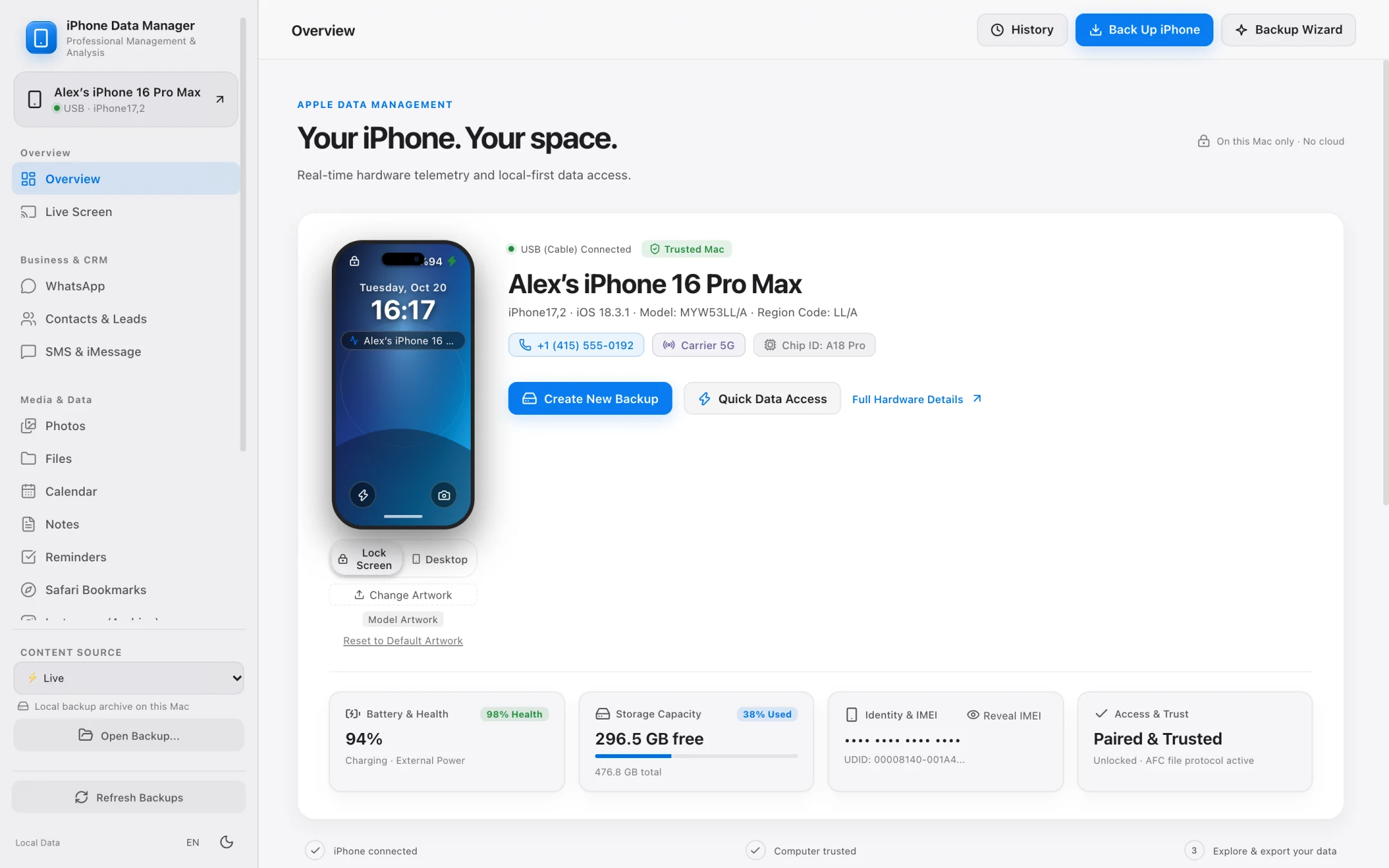
- 100% local
- Notarized by Apple
- No account needed
- Free to try
iPhone Storage & Backup Footprint Calculator
Estimate how much space you can reclaim on your iPhone — and see how much Mac SSD space you save with Lean Mode or direct External SSD backups compared to Finder.
Camera roll, Live Photos, and 4K/ProRes video clips
Chat SQLite database, voice notes, shared documents & videos
iMessage attachments, accessible app folders & local files
Your Storage Optimization Breakdown
Total Analyzed Data: 140 GBReclaimable iPhone Storage
103 GB
Media you can batch-export in original quality to your Mac or external drive and safely remove from your iPhone.
iPhone Data Manager — Lean Mode
Keeps essential SQLite databases (WhatsApp, Contacts, SMS) while sparing up to 90% of your Mac disk space.
Standard Finder Backup (Internal Mac SSD)
140 GB
Finder forces backups onto your internal startup disk without a native external drive picker.
Estimated 5-Year iCloud+ Savings
$180 – $600
By archiving locally to your Mac or external SSD instead of renting monthly cloud tiers.
Why managing iPhone storage with Finder and iCloud feels broken
Apple gives you two extremes: rent more iCloud storage every month, or let Finder dump a 200 GB unreadable backup onto your Mac's internal SSD.
Problem 01
Finder locks backups to your Mac's internal startup disk
If you have a 256 GB iPhone and a 256 GB or 512 GB MacBook, a single Finder backup can choke your Mac's free space unless you manually maintain fragile Terminal symlinks.
Problem 02
Blind photo exports without byte-size previews
Dragging thousands of HEIC photos and 4K ProRes videos out of the Photos app or Image Capture often stalls halfway without telling you the exact item count or total gigabytes beforehand.
Problem 03
WhatsApp databases buried in 'System & App Data'
Years of WhatsApp chats, voice notes, and PDFs quietly grow to 20–50 GB. Without a local iPhone storage manager, you cannot archive searchable chat histories to your computer before clearing space on your phone.
External Drive & Lean Mode
Back up to an external SSD — or shrink backups by up to 90%.
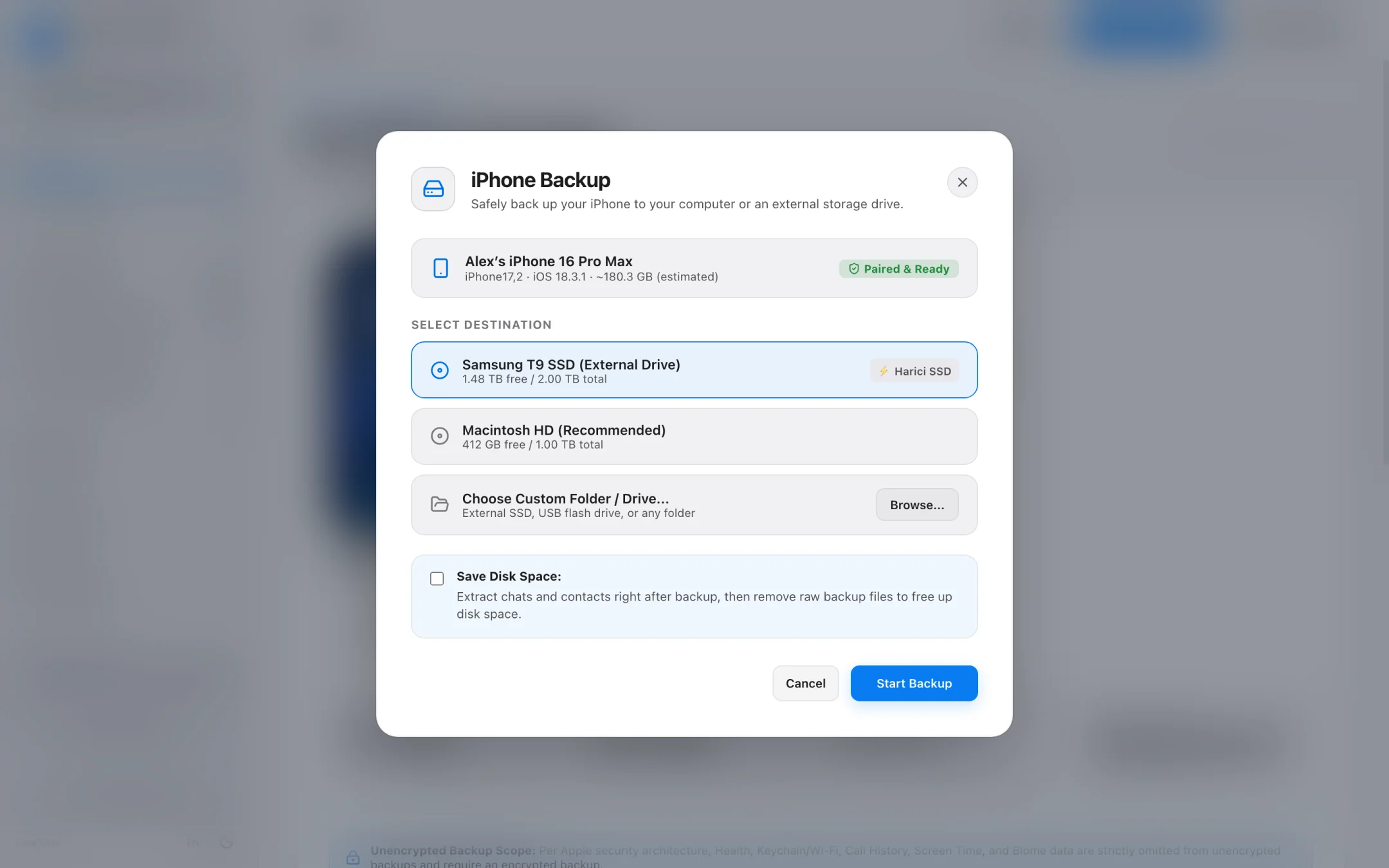
Pick any external USB-C or Thunderbolt drive right inside the app, or enable Lean Mode when you only need critical databases like WhatsApp and Contacts.
- Native destination picker for external SSDs and hard drives — no Terminal commands needed.
- Lean Mode skips heavy media blobs to back up essential databases in just a few gigabytes.
- Real progress measured directly on disk so you never stare at a frozen progress bar.
- Backup Health Check verifies database integrity before you delete old files from your iPhone.
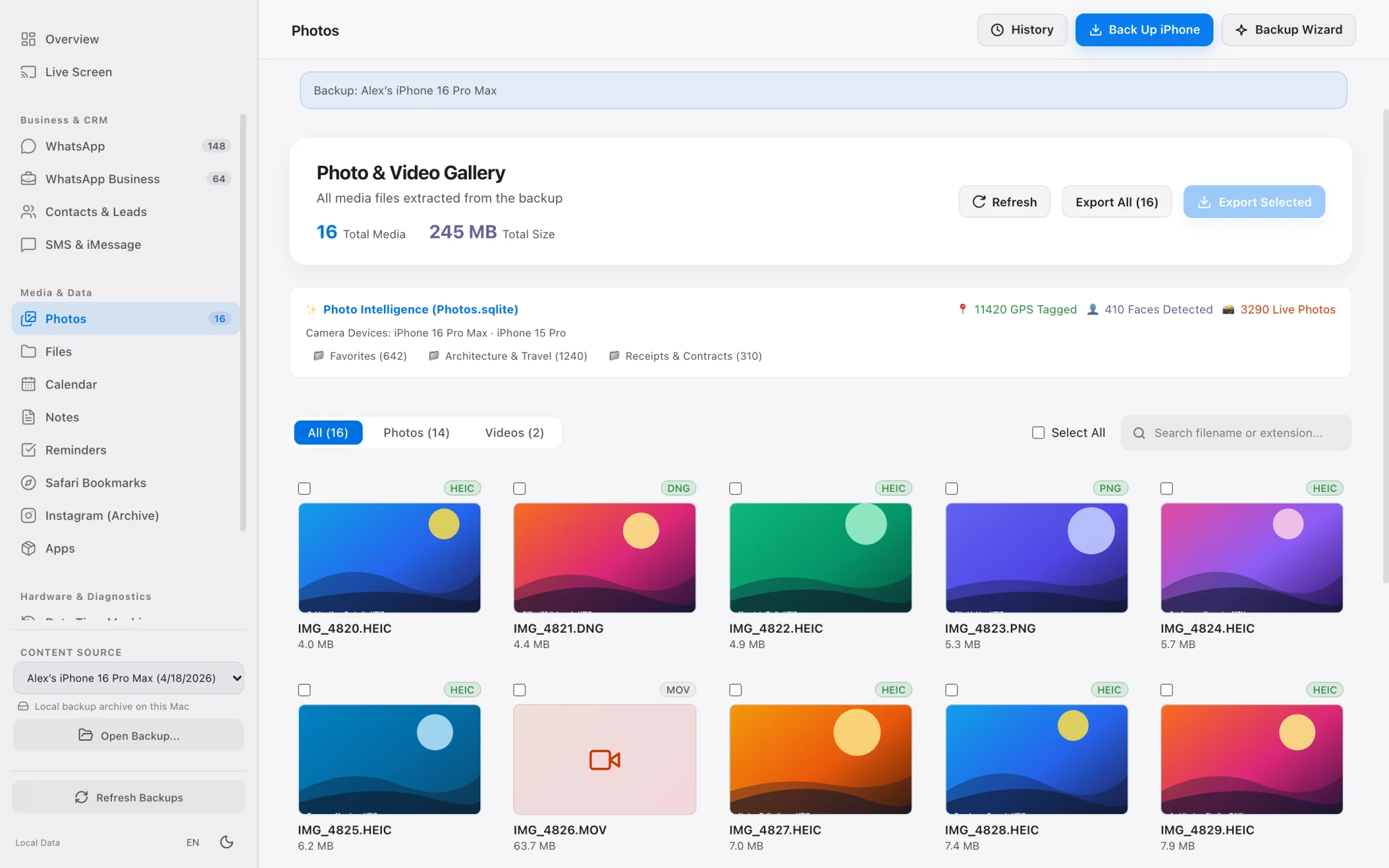
Exact Byte-Size Preview
Offload massive photo and 4K video libraries with precision.
Know the exact item count and byte footprint before you click export. Parallel transfers move gigabytes at native USB speed.
- High-speed grid built for camera rolls with 50,000+ photos and videos.
- Live selection counter displays exact file count and total MB/GB size prior to export.
- Preserves original HEIC, ProRAW, Live Photo and 4K MOV quality without recompression.
- Cancel or resume exports cleanly at any time.
Step-by-Step Workflow
How to Manage iPhone Storage and Reclaim Space Using Your Mac
Audit your iPhone storage breakdown, archive heavy media to an external SSD, and create lean local backups without filling up your Mac.
Connect your iPhone and inspect the Device Dashboard
Plug your iPhone into your Mac via USB (or connect over trusted local Wi-Fi) to see exact used vs. free storage alongside battery health and installed apps.
Back up to an External SSD or enable Lean Mode
Choose an external USB-C/Thunderbolt drive as your backup destination, or toggle Lean Mode to save only essential SQLite databases (WhatsApp, Contacts) using a fraction of the disk space.
Preview exact byte sizes and offload heavy media
Open the fast Photos & Videos grid, see the exact file count and total gigabyte size before exporting, and run parallel transfers to your Mac or external archive.
Storage Management Comparison
iOS Settings vs. Finder vs. iPhone Data Manager
How a dedicated macOS iPhone storage manager gives you control over both your iPhone and your Mac's disk space.
| Storage Task | iOS Settings / iCloud+ | macOS Finder | iPhone Data Manager |
|---|---|---|---|
| Direct Backup to External SSD | Not supported (Cloud only) | Requires manual Terminal symlinks | Built-in 1-click External Drive selector |
| Space-Saving Database Backup | No | No (Full image only) | Yes — Lean Mode saves WhatsApp & Contacts in a few GB |
| Pre-Export Byte Size Calculation | No | No | Exact item count & byte size shown before export |
| Archive Searchable WhatsApp History | Overwritten when deleted on phone | Locked inside unreadable backup | Browse any historical backup & export to CSV / SHA-256 PDF |
| Compare Storage Changes Over Time | Current snapshot only | No diff tool | Data Time Machine compares any two backups by date |
Frequently asked questions.
Does iPhone Data Manager delete files directly from my iPhone?
No. By design, iPhone Data Manager is strictly read-only so it can never accidentally corrupt or erase data on your iPhone. You use it to verify and export your backups, photos, WhatsApp chats, and files to your Mac or external SSD first — and once safely archived, you can clear space on your iPhone with 100% peace of mind.
How does Lean Mode save disk space on my Mac?
A standard iPhone backup copies tens of gigabytes of camera roll media and app caches. Lean Mode selectively backs up only essential structured databases (such as WhatsApp messages and Contacts), turning a 120 GB backup into a few gigabytes.
Can I store my iPhone backups on an external Samsung, SanDisk, or Crucial SSD?
Yes. Any APFS or macOS-compatible external USB-C, Thunderbolt, or USB-A drive connected to your Mac can be chosen directly as your backup and export destination.
How do I check my backup's integrity before freeing up space on my iPhone?
Run the built-in Backup Health Check. It audits your local backup structure and SQLite databases and generates an exportable verification report so you know your archive is intact.
Explore Specialized Workflows
iPhone File Manager
Browse accessible iPhone app folders and decoded local backup file trees without opaque SHA-1 filenames.
iPhone Transfer Software
Transfer photos, 4K videos, WhatsApp chats, SMS, and contacts from iPhone to Mac in standard, open formats.
UltFone Alternative for Mac
See how a 100% native, Apple-notarized, read-only macOS app compares to cross-platform utility suites.
My Data Manager iPhone Guide
Track cellular data quotas in iOS and inspect live network traffic & local backups on your Mac.
See what is on your iPhone today.
Free to download. Browse your data and run full backups before paying a cent.